You know your business. AI builds your application.
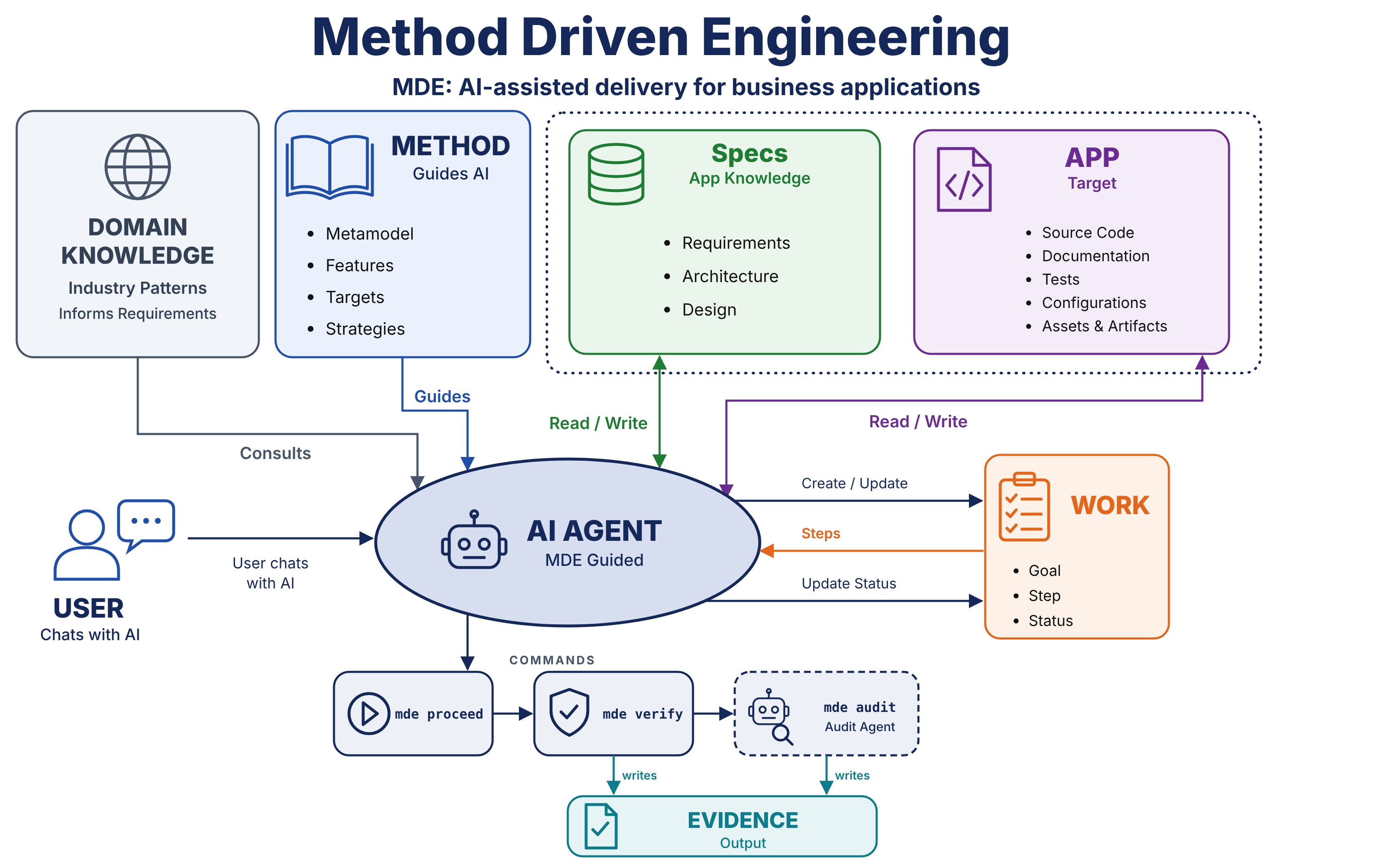
MDE guides AI through the engineering work: interviewing you, modelling your requirements, creating a prototype, designing, building and verifying your application. You provide business knowledge, review the results and make the decisions.
Open source · MIT licensed · In active development
MDE / BUILD WITH INTENT
A method behind every build.
01
AI interviews youBusiness goals, roles & rules
▤
02
AI develops the specificationsRefine them through conversation
◇
03
AI designs & buildsYou review design and architecture
⌘
04
AI verifies the resultTests & traceable evidence
✓
YOU SET THE GOAL.YOU STEER THE WORK.
01 / SIX STEPS, LED BY AI
AI does the engineering. You guide the outcome.
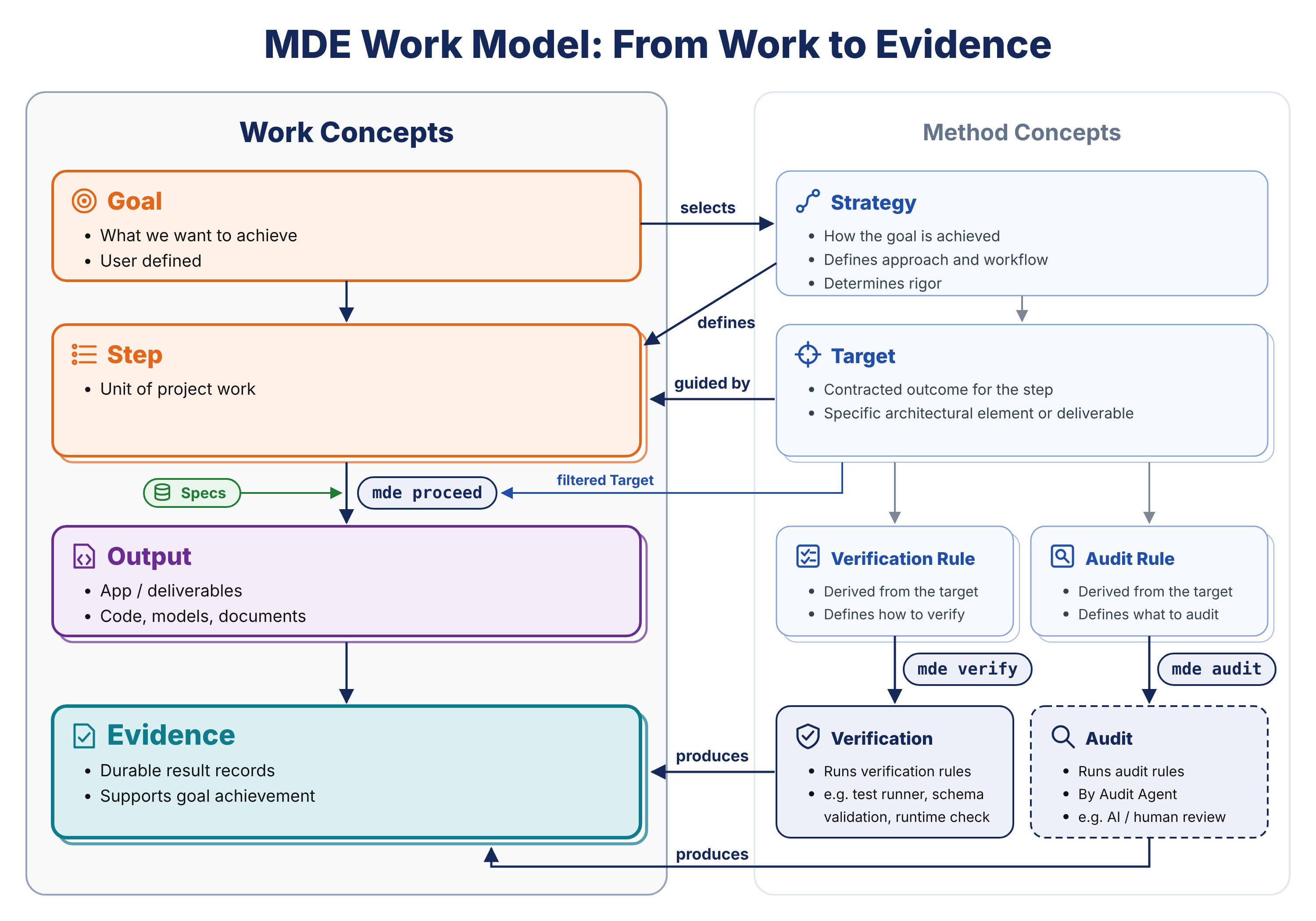
AI follows MDE's engineering method and produces the work at each stage. You answer its questions, review its proposals and ask for changes; AI updates the specifications and implementation. The goal and strategy determine which stages are needed; the sequence below explains a typical journey.
01 / DISCOVER
AI interviews you.
AI asks about the problem, the people involved and how work happens today, then captures goals, exceptions and business rules from your answers.
You review: the business understanding.
02 / SPECIFY
AI models the requirements.
AI organizes entities, relationships, roles, use cases and rules into a structured model, then revises it in response to your feedback.
You review: what the application must do.
03 / EXPLORE
AI creates a prototype.
AI creates sample data and a prototype so you can try the workflows. It uses your feedback to correct misunderstandings before the build.
You review: how the work should feel.
04 / DESIGN
AI proposes the design.
AI proposes design and architecture, including the technology choices and engineering concerns relevant to your project.
You review: design and architecture.
05 / BUILD
AI builds the application.
AI builds against the reviewed specifications and agreed stack, updating the specifications when your feedback changes the requirements.
You review: the resulting workflows.
06 / VERIFY
AI verifies and records evidence.
AI runs checks against the requirements, records results, failures and gaps, and addresses findings. You review the evidence and decide whether the outcome meets your needs.
You review: what has actually been demonstrated.
02 / TWO KINDS OF KNOWLEDGE
How to engineer. What your business needs.
MDE keeps reusable engineering methods distinct from the structured requirements model for your application. Domain knowledge and industry patterns help inform that model.
REUSABLE / THE METHOD
Engineering knowledge
Strategies guide the work. The metamodel defines specification concepts. Features and Targets bring reusable guidance for concerns such as validation, authorization, history and auditability.
Example: guidance for enforcing authorization across an application.
PROJECT-SPECIFIC / THE MODEL
Structured requirements
AI captures your people, entities, relationships, use cases and business rules in a structured requirements model. It develops design and architecture from that model for your review.
Example: a receptionist may book an appointment only with a practitioner qualified for that service.
Both remain visible and editable. Ask AI to explain or revise a rule; review the updated model before that understanding becomes code.
03 / A SERVICE-BUSINESS EXAMPLE
From a booking problem to explicit business rules.
Imagine a service clinic coordinating clients, services and practitioners. The goal is simple: let staff book a suitable appointment without double-booking anyone.
The business story
“We need to match each appointment to someone with the right skills, during their available hours.”
The model AI develops
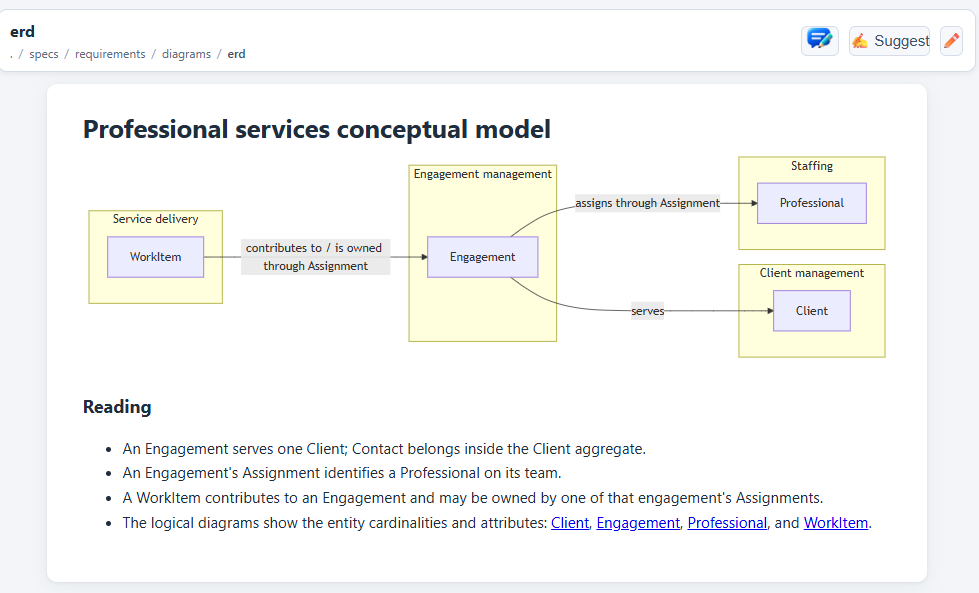
People: clients, reception staff and practitioners. Records: services, availability and appointments. Rules: required skills, full-duration availability and no overlapping bookings.
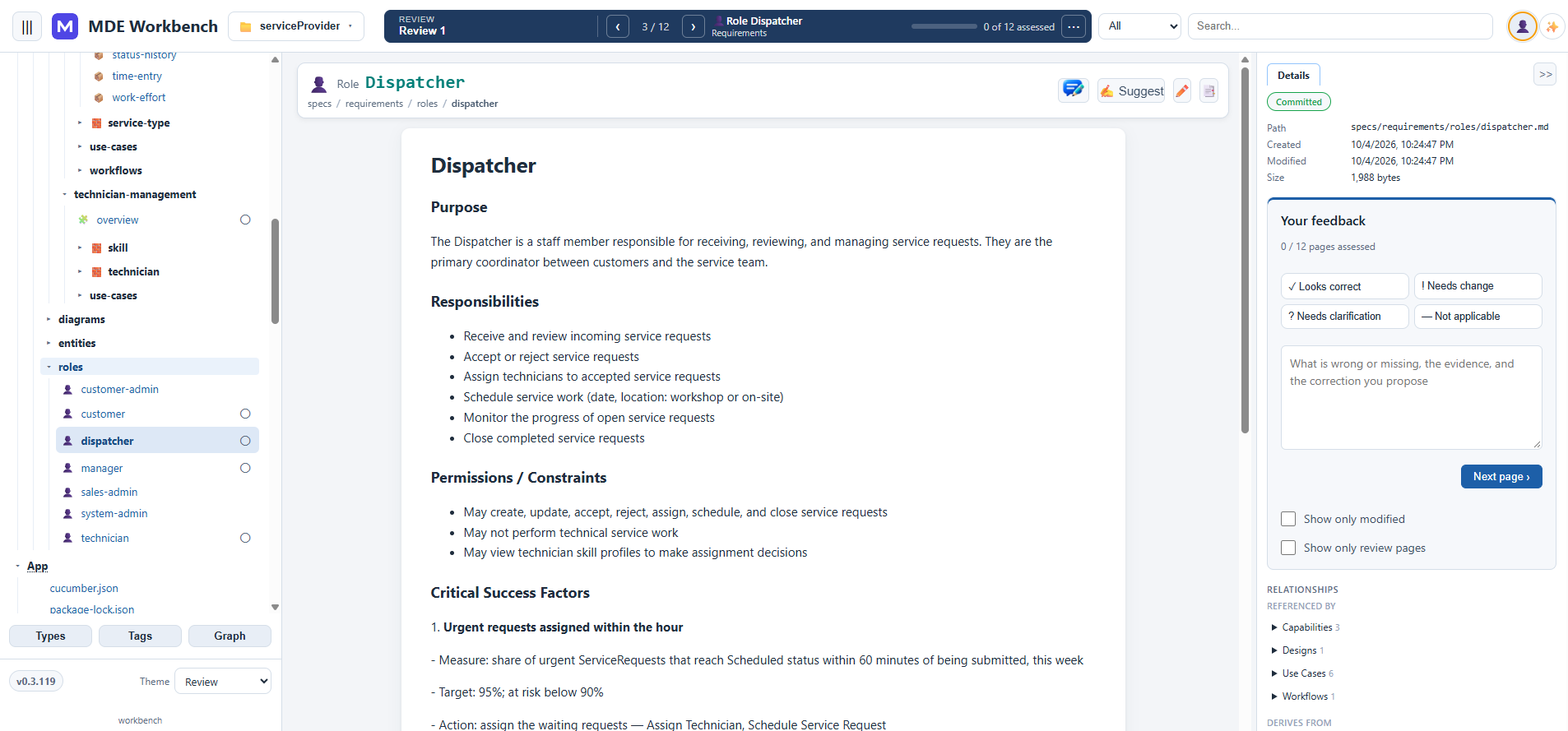
Existing ServiceProvider tutorial screenshot. The booking sandbox below is a separate, illustrative website demo, not an MDE-generated application.
STEP-BY-STEP / MDE TUTORIAL
Watch AI engineer an application.
Follow a real business application from business understanding through requirements, design, architecture, implementation, verification and evidence. The tutorial uses actual MDE Workbench screenshots and shows where engineering knowledge enters the process.
Actual screenshots from the MDE project and Workbench, not an appointment form or a simulated booking service. Browse the interfaces and follow the tutorial for context.
PROJECT WALKTHROUGH
From a business idea to something you can inspect.
Explore the screens, models and reviews captured during MDE development. These are screenshots—no pretend live demo, no appointment booking.
An example of the project information MDE helps you explore.
VERIFY / EVIDENCE YOU CAN REVIEW
AI checks the behavior. You see the evidence.
AI verifies the implementation against the specifications and records what was checked, the result and what remains unresolved. You use that evidence to assess whether the application is ready for its intended use.
AI traces each check to a requirement.
AI identifies the rule or use case each check exercises. For the booking example: a practitioner cannot have overlapping appointments.
AI records the results.
AI collects executed test results, workflow screenshots and relevant audit findings for your review. A planned or unrun check is not a passed check.
AI reports unresolved gaps.
AI records failures, missing coverage and limitations that need a decision. You decide which limitations are acceptable; passing a demo alone does not establish production readiness.
Bring a real business problem. Challenge MDE to build it.
Tell us about a useful business application. AI interviews you to understand your business, then develops requirements, design and architecture for your review before building the final application. For selected challenges, we agree on scope and acceptance criteria, then work toward an application supported by test results and documented limitations.
Availability, timing and delivery terms must be confirmed before work begins; no closing date is published. Useful business applications only. No games, student projects, programming exercises, or toy applications. Submissions are selected based on business value, suitability, and reasonable scope.
01
AI interview & requirementsAI learns how your business works
YOU REVIEW
02
DesignAI proposes how the application will work
YOU REVIEW
03
ArchitectureAI explains the technical approach
YOU REVIEW
04
BuildImplementation against the agreed scope
MDE + AI
05
Verification & evidenceTests and documented results
DELIVER
See what AI believes about your business before that understanding becomes code.
BEGIN / GET STARTED
Tell AI about your business. Let MDE guide its work.
MDE gives AI coding agents such as Codex and Claude Code engineering knowledge, strategies, patterns and verification rules. Describe your business in natural language; AI interviews you, develops and maintains the specifications, and carries out the engineering work.
Share what you know. Tell AI about your business and the problem you want solved. AI asks follow-up questions and turns your answers into specifications.
Begin the conversation. Open the project in your supported AI coding tool, use mde proceed and answer AI's questions. AI develops the specifications for your review.